


F-Secure Mobile Security
4.2172.33K Reviews
App Specs
- Version
- 10.58-c956ec4
- Updated On
- License
- Free
- Downloads
- 100,000,000+
- Developer
- F-Secure Corporation
- Categories
- Tools
- Platform
- Android
Screenshots

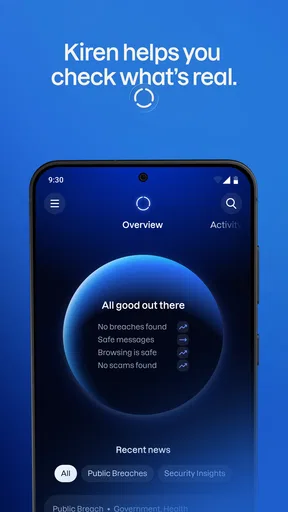
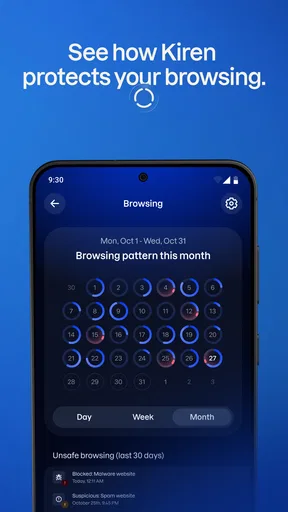
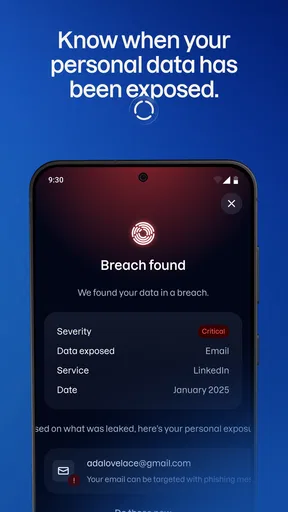
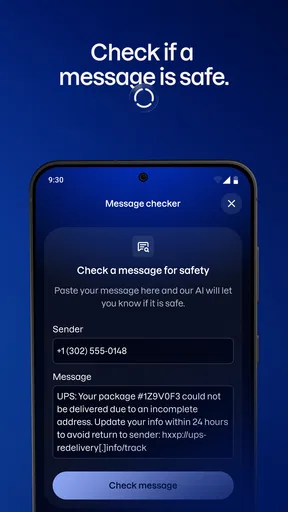
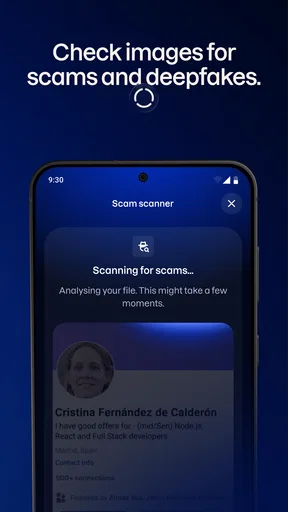
 Analysis by AppCompare
I judge a phone security app less by how dramatic its warnings look and more by whether it can fit into ordinary routines without becoming another chore. F-Secure Mobile Security is aimed at people who want security tools close at hand, but its real value depends on how you use your phone and what you expect an app to handle. I’d treat it as one layer of protection, not a reason to stop checking links, downloads, or device settings yourself.
What to expect from its speed
F-Secure Corporation makes this free Tools app, which has an average rating of 4.2 from around 1.1 million ratings and more than 100 million installs. Those figures suggest that it is a familiar choice, but popularity alone doesn’t tell me how it will feel on a particular phone. The current version is 10.57-ff32089, and the minimum operating system requirement is Android 7.0.
Security software can do work in the background, so I wouldn’t expect every scan or check to be invisible in every situation. A sensible way to judge the experience is to use the phone normally after setup: browse, install apps you trust, and notice whether any checks interrupt what you’re doing. I’d avoid running extra security scans simply for reassurance if the app is already doing its routine work; repeated manual checks can add waiting without making everyday decisions any safer.
Guides and Analysis on F-Secure Mobile Security
Where everyday use gets demanding
The app is most useful when it supports decisions you already make, such as whether to open an unfamiliar link or install something from a source you don’t know well. A practical routine is to pause at that moment, read any warning, and back out if the destination seems suspicious. That is more helpful than treating a security tool as permission to click freely.
Heavy use also means juggling several apps and tasks, not just scanning. If your phone is already busy, I’d finish a large download or other time-sensitive task before starting a manual check, then see whether the security app reports anything that needs attention. This keeps a scan from feeling like a surprise slowdown and makes it easier to tell whether a delay comes from the phone’s workload or the security task.
Reliability is about habits as well as alerts
I like security tools best when they make a risky moment easier to recognize, but a warning cannot make every online choice for me. I would still check the spelling of a web address, avoid entering account details after following an unexpected message, and keep the phone’s own software current. Those habits remain important even with a dedicated security app installed.
F-Secure Mobile Security is free to download, with in-app purchases ranging from $0.99 to $99.99 per item, and its content rating is Everyone. That makes it approachable to try, though I’d review any purchase prompt carefully and decide whether a paid option is useful for my needs before committing. It has 174,000 reviews as well as its large rating total, so there is plenty of user feedback to consult, but individual experiences can vary with device, settings, and expectations.
Worth Reading Before You Choose

Switching to Android Auto Means Rethinking Your Driving Routine

Google Calendar Makes a Crowded Week Easier to Manage

Ludo King Makes the Most of the Minutes Between Plans

Baby Panda World Brings Quick Play to Modern Phones, but Its Game Library Feels Busy

ESPN’s Live Game View Makes Following Close Games Easier

QuizzLand Review: A Good Fit for Short Trivia Breaks, Not Every Player
Device fit and practical limits
The Android 7.0 minimum makes the app relevant to a broad range of Android devices, but an older phone may have less room for additional background work than a newer one. If your handset already feels slow, install one security tool at a time, give it a fair trial, and pay attention to ordinary tasks such as opening apps and browsing. That is a better test than assuming a general claim about battery or speed applies equally to every model.
This is not necessarily the right choice for someone who wants no extra security app at all, or for a person whose main concern is a feature they have not checked is included in the version they plan to use. I’d also avoid stacking multiple antivirus apps: overlapping tools can complicate alerts and make it harder to know which one is responsible for a warning. For someone who prefers the phone’s built-in protections and is comfortable checking links carefully, those may be enough for their routine.
Getting Started with F-Secure Mobile Security
First things first, downloading and installing F-Secure Mobile Security was as smooth as butter. A few taps here and there, and I was all set. The app's interface is clean and intuitive, which made navigation a breeze. You know how some security apps can be a bit overwhelming? Not this one. It’s like they knew exactly what I needed before I even had a chance to get confused.
Features That Stand Out
What really caught my eye were the comprehensive features. From antivirus protection to browsing security, this app has it all. The antivirus protection works seamlessly in the background, ensuring that any malicious software doesn’t stand a chance. Plus, it’s constantly updated to tackle the latest threats. No more paranoia about sketchy downloads!
The browsing protection is another feature I didn’t know I needed until I had it. It’s like having a digital bodyguard that ensures you don’t wander into dangerous corners of the internet. The app warns you if a site is unsafe, which is super handy for someone like me who often finds themselves clicking on random links.
Privacy and Theft Protection
One of my favorite features has to be the privacy protection. In this day and age, personal data is gold, and F-Secure knows how to keep it safe. The app provides a neat little option to lock specific apps with a pin or fingerprint. So, if you’re like me and have that nosy friend who loves to snoop through your photos, this is a lifesaver.
And let’s not forget the theft protection. Imagine losing your phone – nightmare, right? With F-Secure, you can locate your device, remotely lock it, or even wipe it clean if it comes to that. It’s like having a contingency plan in your pocket.
Performance and Battery Life
Now, I was a bit worried about how such a powerful app would affect my phone’s performance and battery life. Nobody wants their phone to turn into a sluggish brick, right? Thankfully, F-Secure Mobile Security is optimized in a way that it barely makes a dent in battery life. The app runs quietly in the background without hogging resources.
User Experience and Support
In terms of user experience, F-Secure has nailed it. The app feels like a reliable companion rather than an intrusive tool. And for those moments when you do need a bit of help, their customer support is top-notch. I had a minor hiccup during setup, and their team was quick to assist.
A realistic routine and a useful trade-off
Picture a familiar situation: a message arrives while you’re commuting, with a link that claims you need to check an account immediately. I’d use the warning from a browsing security tool as a reason to stop and think, not as a substitute for checking who sent the message. If the address looks wrong or the request feels urgent in an unusual way, close it and visit the service through a route you already trust. The app can be a helpful extra checkpoint, while your own caution remains the deciding factor.
That distinction matters when comparing F-Secure with the usual alternatives. Some people prefer to rely on built-in Android protections and careful habits; others choose a dedicated security app because they want additional checks and tools collected in one place. I see F-Secure as the latter kind of option. It makes more sense for someone who wants a visible security companion than for someone who is already satisfied with the phone’s existing safeguards and wants the fewest possible apps.
How to make setup and recovery less stressful
Before relying on any phone security app for a stressful situation, I’d take a quiet moment to understand where its protections are and what steps they involve. For theft protection in particular, think through how you would attempt to locate or lock the device if it went missing, and make sure you know how to reach the relevant controls. A tool is most useful when you have already considered the process rather than trying to learn it in a panic.
I’d also be deliberate about app locking. It is most practical for a small number of sensitive apps that you genuinely want to keep private, rather than placing another checkpoint in front of everything you open. That keeps the protection targeted and reduces the chance that a privacy measure becomes an everyday annoyance. If another person occasionally borrows your phone, it can be a sensible boundary; if you are the only user and value quick access above all, you may not need to lock much.
One limitation worth keeping in mind is that no security app can remove the need to make sensible choices online or guarantee that a lost phone will be recovered. Remote actions depend on being able to use the relevant controls, and an alert is only useful if you respond to it thoughtfully. I would not install this expecting it to replace backups, account security, or common sense. It complements those precautions rather than taking their place.
Who will appreciate it most
I’d point this toward an Android user who often follows links, downloads apps, or lends their phone to other people and wants dedicated security tools in addition to ordinary care. It may also suit someone who is uneasy about losing a device and values having theft-related actions available. The best fit is a person willing to review warnings and settings, not someone expecting every risk to disappear automatically after installation.
If your priority is the lightest possible setup, you rarely install unfamiliar apps, and you already use the phone’s built-in protections carefully, adding another security app may not improve your day enough to justify it. Likewise, anyone choosing a security product mainly for one particular function should check that the available version meets that need before depending on it. I’d rather make that decision deliberately than assume every security app offers the same tools in the same way.
Performance verdict
My practical verdict is that F-Secure Mobile Security is best judged over ordinary use, not by expecting a dramatic speed boost or a guarantee of perfect recovery. I would install it for the extra security checks and the convenience of having privacy and theft tools nearby, then watch how it behaves on my own device. If alerts are useful and routine phone tasks still feel comfortable, it earns its place; if it adds friction without changing how safely you use the phone, a simpler setup may suit you better.
To sum it all up, F-Secure Mobile Security is a robust app that brings peace of mind in an increasingly digital world. Whether it's protecting your data, ensuring safe browsing, or providing theft protection, it covers all bases with ease. If you’re looking for a reliable app to keep your phone safe without compromising on performance, this might just be your go-to.
Pros
- Robust virus protection features.
- User-friendly interface design.
- Real-time browsing protection.
- Automatic app scanning for threats.
- Minimal impact on device performance.
Cons
- Limited features in free version.
- Occasional false-positive alerts.
- Requires regular updates.
- Subscription can be pricey.
- No VPN included in package.
FAQs for F-Secure Mobile Security
What is F-Secure Mobile Security, and how does it protect my device?
F-Secure Mobile Security is a comprehensive security app designed to protect your Android or iOS device from various threats including malware, viruses, and phishing attempts. It offers real-time scanning and secure browsing features to ensure your personal data and online activities remain safe from cyber threats.
Does F-Secure Mobile Security affect device performance or battery life?
F-Secure Mobile Security is optimized to run efficiently in the background without significantly impacting device performance or battery life. The app is designed to use minimal resources while providing maximum protection, ensuring that your device remains fast and responsive during everyday use.
Can F-Secure Mobile Security protect my privacy when browsing the internet?
Yes, F-Secure Mobile Security includes a secure browsing feature that helps protect your privacy online. It blocks harmful websites and phishing attempts, ensuring your personal information remains confidential while you surf the web. This feature is crucial for safeguarding sensitive data like passwords and credit card details.
Is F-Secure Mobile Security easy to use for non-technical users?
F-Secure Mobile Security is designed with a user-friendly interface, making it accessible even for non-technical users. The app provides straightforward instructions and intuitive controls that simplify the process of securing your device. Additionally, its automatic updates ensure continuous protection without requiring manual intervention.
What kind of support does F-Secure Mobile Security offer if I encounter issues?
F-Secure provides comprehensive support for its Mobile Security app, including a detailed help section within the app, online resources, and customer support via email or chat. This ensures that users can resolve any issues quickly and efficiently, maintaining the security of their device without interruptions.


